
Webflow SEO 2025: how to make search engines love your site
Webflow is more than just a tool for building visually sophisticated websites. Its built-in SEO tools also make it easy to get your site fit for search engines. That is why SEO is an essential part of your online strategy. Without the right preparation, even a website that is a real eye-catcher achieves very little.
In this article we take a closer look at how Webflow supports SEO and which measures you can take to conquer the search results in your industry.
👉 Still unsure whether Webflow is the right platform for your project at all? Then take a look at our comparison Webflow vs. WordPress.
Is Webflow good for SEO?
If you research no-code or low-code and SEO online, you often come across the same claims: no-code is bad for SEO, search engines have trouble indexing the site, and in general, coded solutions are much better for search engine optimisation. But there is simply nothing to these myths: no-code solutions such as Webflow can easily keep up with the capabilities of other tools or of hand-coded sites.
The platform impresses with numerous features that can make a noticeable difference to SEO performance, especially in direct comparison with other solutions. Website owners who rely on Webflow benefit from a whole range of SEO advantages:
- Fast load times: Sites built with Webflow often load faster than sites built with other solutions. Search engines generally prefer websites with good page speed, so Webflow has the edge here.
- Technically clean: Unlike other solutions such as Elementor or Wix, Webflow gives you full control over the code. So important elements such as H1 headings are not hidden behind countless other elements. That makes it easier for crawlers to find and index the content faster.
- Hosting included: Your site's speed often depends on the hosting, so it is frequently in the hands of your host. Webflow, however, offers hosting and website in one package. You benefit from lightning-fast servers and a CDN that delivers your content quickly to international visitors too.
👉 Want even more reasons why Webflow is the better choice? Read our article The best WordPress alternatives 2025.
The most important SEO features in Webflow
Webflow and SEO go together. Webflow offers SEO tools that make optimising our content easier than ever:
- Full control over meta description & title: With the meta description and the meta title, we tell Google & co. what our page is about. Thanks to Webflow, we have full control over all meta tags and other meta information relevant to our website.
- Quick creation of robots.txt: Crawlers are probably one of the most important technical features search engines use to index our website. With a robots.txt file, we can tell bots and crawlers which areas of our website they should index, and which not. Here too, Webflow offers maximum control over whom we let onto our website.
- Automated sitemaps: Besides technically flawless SEO, using sitemaps is essential. It is the only way for search engines to really know how the subpages of our website relate to each other. In Webflow's SEO settings, we can have a sitemap created at the push of a button that automatically contains all published pages of our web presence, with no manual updates.
These features make sure our online presence is technically well set up for SEO. But to use these functions effectively, we also have to fill our site with the right content and make the most of every advantage.
👉 Want to make sure your Webflow site runs technically perfectly? Our Webflow support helps you with all questions about optimisation, SEO and further development.
Implementing on-page SEO in Webflow properly
It all starts with the structure of our site. We have to make sure that our page's URL (slug) is readable and contains relevant keywords we want to rank well for. For pages that belong to a parent category, it makes sense to use Webflow's folder structure. That way we always keep a good overview of our website, and URLs are adjusted logically and consistently for our pages (e.g. /services/xxx or /about-us/xxx).
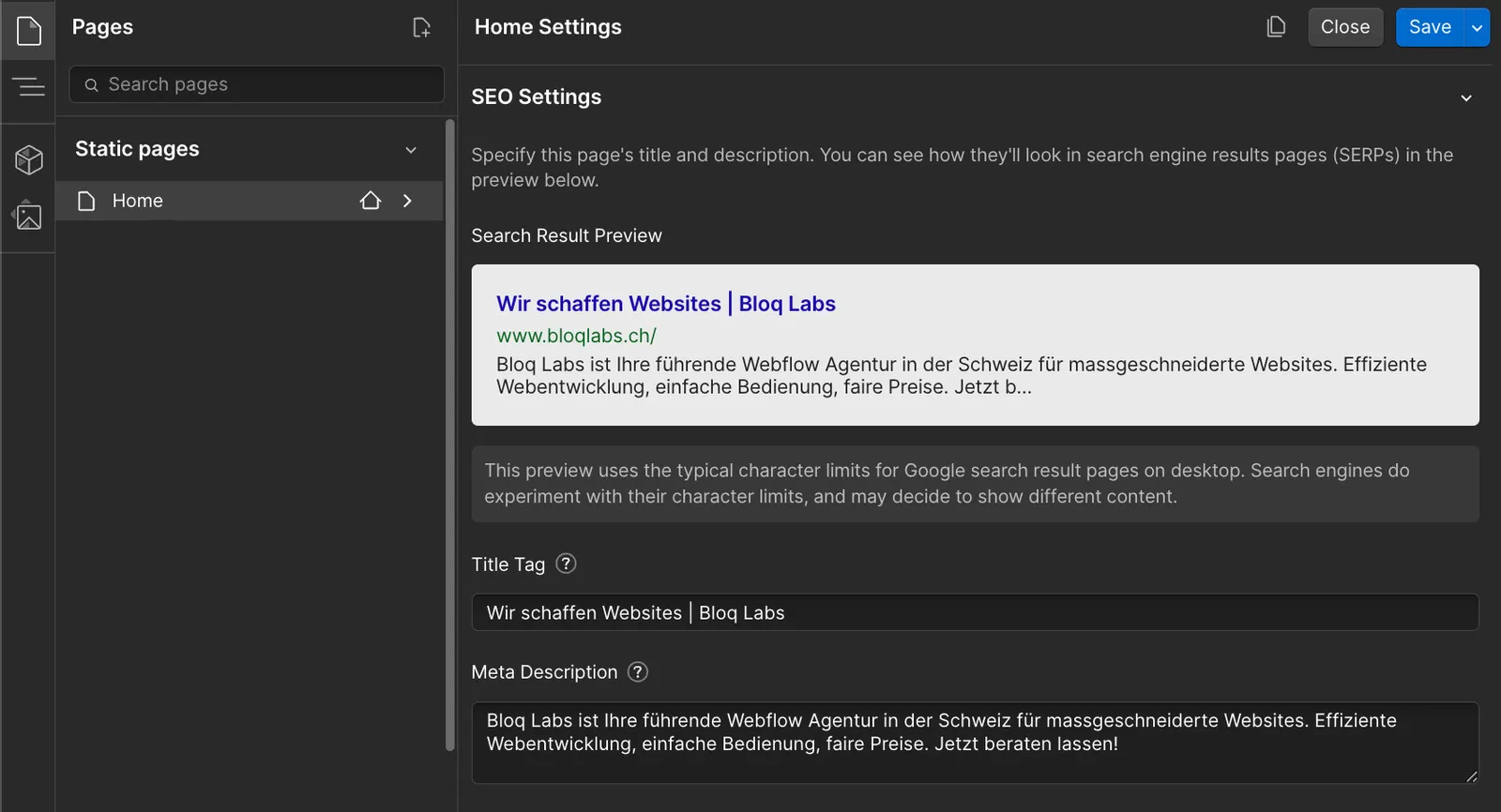
At least as important is filling in the meta tags correctly and completely. Besides the meta title, that includes the meta description. Together, they help search engines, and the users on our site, work out what each page is about. Webflow's SEO settings let us fill in our website's key data in a few clicks; for CMS content, we can even set them to be filled in automatically for every item but adapted to its content.
Despite these useful features Webflow offers for SEO optimisation, we must not lose sight of the basics of technically clean on-page SEO. Our headings must be assigned in a logical order, from H1 to H5 (or even deeper). Fortunately, Webflow even warns us directly in the editor if we have skipped a heading level (e.g. H3), another useful Webflow SEO tool that makes our everyday work even easier. Likewise, every image needs an alt text, so that search engines and screen readers know what the image is about. Best practice here is to include decorative graphics too. Webflow lets us mark graphics (such as background graphics) as decorative. Even supposedly small tricks like these help make the SEO on our Webflow site even better.
👉 Want to find out more about what makes a good website? In our article What makes a good website? we give you 6 practical tips.
Technical SEO in Webflow
SEO is more than just text: search engines also read other parts of your content and use them to index your site. These include images, links and structures, for example. Graphic content must contain an alt description so that what is shown visually is also described to users with screen readers. Links should always clearly describe what happens when you click on the element (e.g. "Book a consultation now" instead of "Click here"). You can edit all these factors directly in Webflow, and so make sure your website is ready for search engine optimisation.
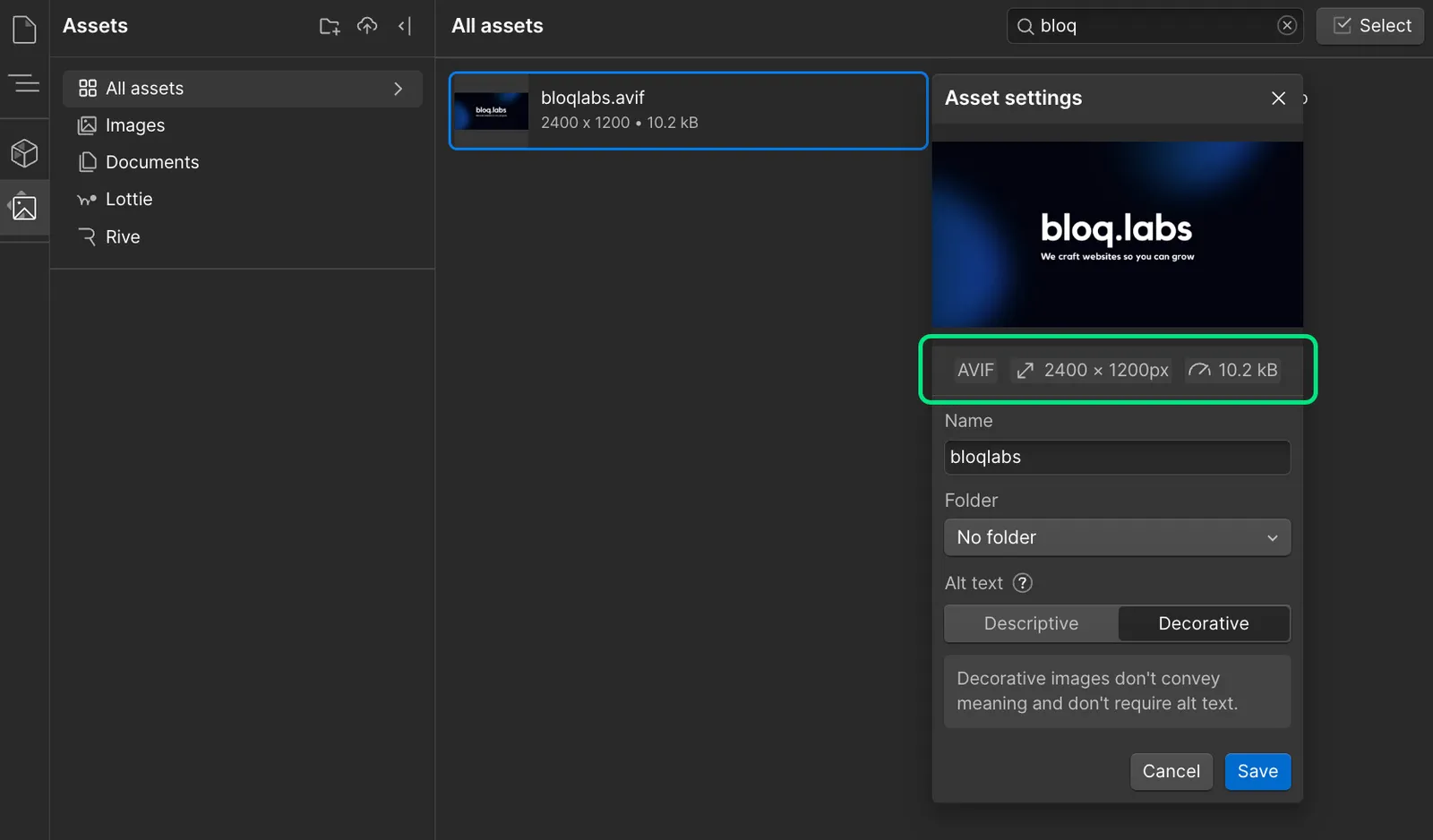
Webflow even lets you compress uploaded images directly in the editor and convert them to modern file formats (such as AVIF or WebP). That not only saves storage on our website but also massively reduces load times for graphics and other elements. Speed is one of the decisive factors for the Core Web Vitals and also plays an important role in the user experience. Because if a page takes more than 3 seconds to load the first visual content, many visitors will already have left our site. Combined with lazy loading, our site loads quickly and efficiently, without compromising on user experience.
Blogging & content marketing with Webflow
Webflow is far more than a simple website builder. Thanks to its powerful content management system (CMS), we can turn our website into a blog, a real estate site or any other kind of site imaginable in a few clicks. The intuitive back end makes content management so easy that even beginners without technical expertise can create, maintain and manage content.
Of course, SEO does not come up short in Webflow's content management either. We have full control over our on-page SEO: besides dynamically generated meta titles and descriptions, which we adapt across all CMS content, we can even write the alt texts for our images and so make sure we get the most out of our SEO efforts.
SEO migration to Webflow: risks & solutions
What do we do if we want to migrate an existing website to Webflow? What sounds like a huge undertaking at first is long since no obstacle for an experienced Webflow agency such as Bloq Labs. We have already helped countless companies make the move to Webflow, so we know what it takes to avoid harming an existing site's ranking.
When moving, the main thing is to maintain the existing hierarchies between pages and content; otherwise you risk broken links, 404 pages or other negative experiences that hold back the user experience. So that your users still find what they are looking for, you need to make sure you use redirects and other Webflow SEO tools. With these useful helpers, you can make sure your site's hierarchy stays intact and no unnecessary errors occur.
Fortunately, Webflow is designed so that we can make the right settings quickly, and make sure the site still runs technically flawlessly after the move.
The big Webflow SEO checklist
Want to improve your Webflow SEO? Starting from zero and want to know how to optimise your site for search engines? With our Webflow SEO checklist, you can quickly go through all the essential points you need for better rankings in the search results.
- Structure URLs and include keywords: The URL gives search engines their first clues about what a page is about. The slug should therefore always be readable and contain keywords that can have a positive effect on the page's ranking. 👉 See also What makes a good website?
- Optimise meta tags manually: Webflow lets you adjust the meta tags of every single page. Use this function and optimise your meta titles and meta descriptions to achieve the best possible results.
- Create a sitemap & robots.txt: Use the built-in Webflow SEO tool to generate a sitemap for your site (and keep it up to date). Create a robots.txt to keep bots and crawlers away from certain areas of your site.
- Heading hierarchy & alt texts: Structure your headings (H1, H2 etc.) in a logical order and make sure you do not skip any. Give every image an alt text and mark graphics that are purely decorative as "decorative".
- Internal linking: Linking your pages to each other does not only help send your users quickly to the right places. It also helps search engines understand your website's content faster. 👉 You will also find tips on structure in our article on Webflow migration.
- Test page speed: Online, performance is a factor that quickly decides success or failure. Test your site's speed regularly to score important points for SEO here too. Remember to activate features such as lazy loading for images that are not displayed directly above the fold.
- Connect Google Search Console and Analytics: Tools such as Google Analytics can provide important insights into user behaviour on your site. Together with Google Search Console, you get valuable data on how visitors reach your website and which keywords are particularly important for you. 👉 Our Webflow support helps you set them up.
- Compress & optimise images: Use modern image formats such as WebP or AVIF and use Webflow's built-in compression to improve load times. You can find more on Webflow image optimisation in our article Webflow & AI: 5 tools for your Webflow website.
- Activate lazy loading: Delay loading images that are not in the visible area of the page to increase performance.
- Set canonical tags: Avoid duplicate content by defining canonical tags for duplicated content.
- Design & monitor error pages: Set up custom 404 pages and regularly monitor your website for broken links.
- Set up redirects when pages change: When URLs change, redirects should be set up to avoid SEO losses.
- Optimise Open Graph & social sharing: Optimise preview texts and images for social media to increase the click-through rate.
- Add a favicon & web manifest: These small files improve how your site appears in browser tabs and on mobile devices.
- Take accessibility into account: Use ARIA labels, alt texts and clear contrasts for better accessibility; search engines reward that too.
- Add structured data (Schema.org): Help Google better understand and display content such as events, products or articles.
Conclusion: Webflow is a powerful SEO tool, if you use it properly
Search engine optimisation is more than decoration: only with technically and editorially flawless SEO can we improve our ranking and bring more visitors to our website. With Webflow, SEO optimisation could hardly be easier, provided you have the right knowledge and plan carefully.
As an experienced website builder and Webflow SEO agency, we not only bring your website to life; we also make sure that, thanks to SEO, you rank higher and generate more leads, visitors and clients for your site.
👉 Book your free consultation now and find out how you can really take off online with Bloq Labs!